
Security Configuration
It is optional but recommended to create a separate backup user. In the next step we will connect our PBS to Proxmox VE, and for that you need a user. You could simply use the root user, but best practices dictate that a separate user is better for security reasons. Also, Add Two Factor Authentication to secure your root account.
Note: a user that has Two Factor Authentication, can't be used to connect your PBS to Proxmox VE. That is also why we created a separate backup user in the previous step.
Adding Backup User
- Login to PBS
- Under Configuration go to Access Control and click Add
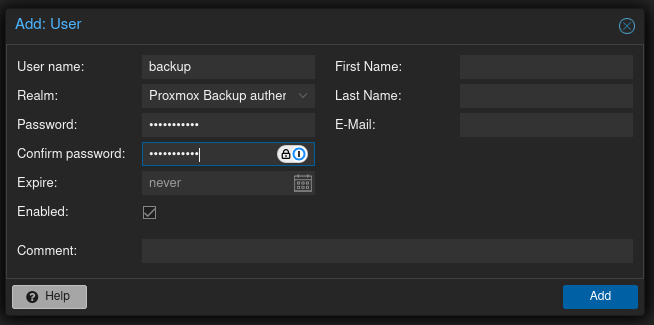
- In new user window
- Give it a name
- Realm: Proxmox Backup authenticator
- Choose strong password
- Make sure Enabled is checked and it doesn't expire
- Now that the account has been created, we also need to give it the correct permissions.
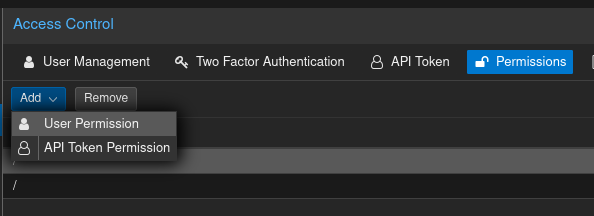
- Go the Permissions tab
- Click Add and select User Permission
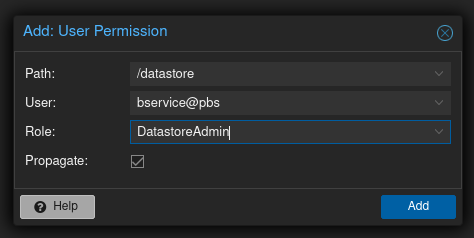
- In User Premission Window
- Path: select datastore only
- User: choose backup user you created
- Role: Choose DatastoreAdmin
- Make sure Propagate is selected
- Click Add
Enabling Two Factor Authentication
- Go to Access Control
- Select Two Factor Authentication and click Add
- Select TOTP and Fill the required details using your preferred password manager
You have to do this for each user