
Authentik OAuth/ OIDC Setup - Home Assistnat
Authentik uses many ways to connect to services, one being OAuth or Open ID Connect. This method is widely used on many services, such as Home Assistant. Home Assistant doesn't have native Open ID Connection, so we will need to use HACS for setup
Please follow Authentik and Portainer documentation
Authentik OAuth:
- Login to Authentik Admin Interface
- Go to Applications and select Create with Provider
- Choose a name and group
- Under URI in Launch URL enter https://portainer.cyberpaw.org
- Choose Oauth2 Provider
- Name the provider same as application
- For Authorization Flow choose Cyberpaw-authorization-flow (or default one)
- Make sure Confidential is selected for Client Type
- Copy Client ID and Client Key
- In Redirect URIs enter http://overseer.cyberpaw.org:8123/auth/openid/callback
- For Encryption key choose default-authentic-self-signed-certificate
- Under Advanced flow settings choose Welcome to Authentick (or default one)
- Under Configure Bindings click Bind existing policy/group/users
- Select Group and choose existing group that is authorized to use this service
- Review and Submit
- The provider is created and should say it's connected to application
Home Assistant Steps:
- Login to Home Assistant with Admin
- Open HACS
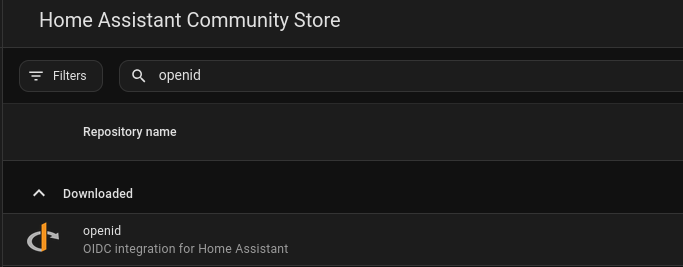
- Search for hass-openid
- Go to Terminal app on HA
- Navigate to Your Home Assistant Config Directory
cd /config- Create custom_components Directory
mkdir -p /config/custom_components/openid- Download the Files from GitHub
git clone https://github.com/cavefire/hass-openid.git
cp -r hass-openid/custom_components/openid /config/custom_components/- Restart Home Assistant
- Go back to Terminal and add following configuration to configuration.yaml file
  #OAuth with Authentik
openid:
  client_id: YOUR_CLIENT_ID
  client_secret: YOUR_CLIENT_SECRET
  configure_url: "https://auth.cyberpaw.org/application/o/home-assistant/.well-known/openid-configuration"  # Replace with your Identity Provider's URL
  username_field: "email"  # Adjust based on your IdP's user info response
  scope: "openid profile email"
  block_login: false
openid_text: "Login with Authentik" # Text to display on the login page- Restart Home Assistant
If you want to disable the default Home Assistant login and only allow OpenID authentication, set block_login to true in your configuration