Schedule Backup Job with PBS
This guide goes over scheduling backup job with PBS server. Proxmox Virtual Environment can run it's own jobs, but for best optimization, using deducation and verify jobs, having PBS is good idea. Also, it provides redundancy if pve goes down.
Using Proxmox Backup Server (PBS) over Proxmox VE (PVE) native backups offers several significant advantages, particularly for environments requiring efficient, secure, and reliable backup management. The primary benefit is that PBS performs incremental backups, transferring only changed data since the last backup, which drastically reduces backup time and network bandwidth usage compared to PVE’s full backup approach that copies entire VM or container images each time. This incremental method, combined with advanced deduplication, ensures that duplicate data across multiple VMs or containers is stored only once, leading to substantial space savings and allowing for more frequent backups without excessive storage consumption.
Setting up Datastore in Proxmox Backup Server
- Login to PBS
- Under Datastore click Create Datastore
- Name: Choose name to call it
- Backup Path: Select the path to folder directory on the machine. If not using volume from machine check out this article to use NAS storage via NFS
- Prune and GC Jobs leave
atat Daily - Under Prune option this is personal preference, but deduplication really lowers the amount of space needed, so keeping more backups is not bad decision.
- Once done click Add
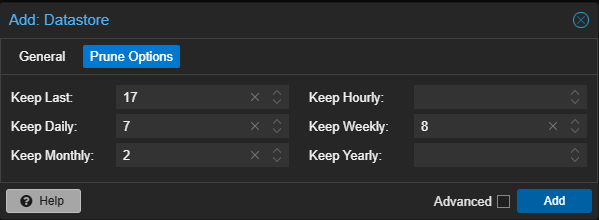
When the datastore is added, clicking on datastore will give you info, and also ability to adjust Prune and CG Jobs. Also, under Verify Jobs it's good idea to add Verify Job for checking that backup isn't corrupted and that will work when needed.
Adding PBS Database on PVE instance
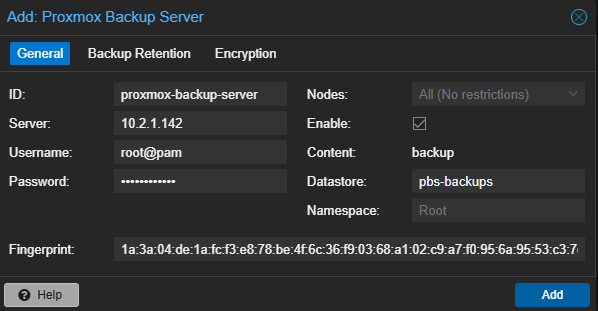
- Select Datacenter > Storage > Add > Proxmox Backup Server.
- Set the parameters to match the information below:
- ID: the name you’d like to use (I use pbs-backups).
- Server: IP address of Proxmox Backup Server.
- Username: bservice@pbs (use user made specifically for pbs to pve connection).
- Password: Password of the user.
- Datastore: Name of the datastore you created in PBS.
- Fingerprint: hash from PBS server. Paste the fingerprint copied from the PBS dashboard
- Add Database
Add a Backup Job in PVE
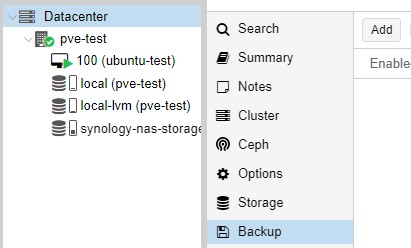
AddLoginDatabase.back to Proxmox Virtual Environment- Select Datacenter then Backup, then select Add
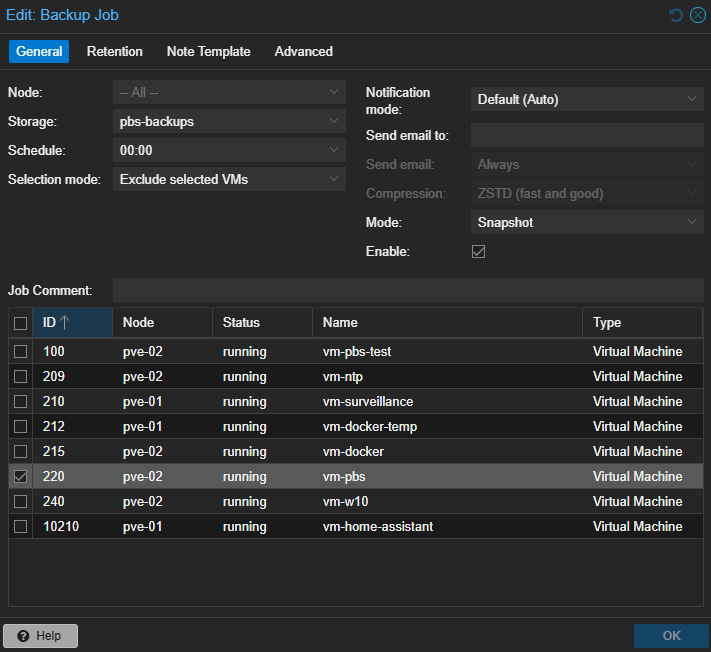
- Under General
- Select PBS Storage
- Schedule put a time that works best
- Selection Mode: best to do All
- Mode: Stapshot is the most reliable for daily backup. Stop can be run once a week
- Retention
- This is configured on PBS side
- Under General
ClickClickOKOK to schedule the backup